Text To Sql
Can I fine-tune the Qwen3 0.6B model so that it can generate SQL that meets the requirements of the given SQL schema?
In this example, I fine-tuned the Qwen3 1.7B model on instructions and sql outputs on gretelai/synthetic_text_to_sql dataset. Given a database schema and a natural-language question, the model is trained to return JSON with sql and explanation fields. Outputs are not guaranteed correct or safe to execute.
The question
Can I fine-tune the Qwen3 0.6B model so that it can generate SQL that meets the requirements of the given SQL schema?
Approach
- 105,851 training examples but used 27,500 because of poor GPU
- 2,500 test and 25,000 train set
- Qwen3 0.6B as base model
- unsloth for gpu efficiency and speed up the train
Result
I fine-tuned the Qwen3 model on 25,000 examples. However, what I overlooked here was the quality of the dataset. I trained the model using a fixed JSON schema, and while the model learned the schema perfectly, the SQL code it generated didn’t work correctly. After doing some research, I discovered that the dataset was a synthetic one created in 2024, and it was clear that some examples didn’t produce SQL output that worked correctly.
Since I put a lot of effort into training this model and benchmarking it - and since it was the first LLM I ever trained—I’m proud to showcase this failed model in my portfolio.
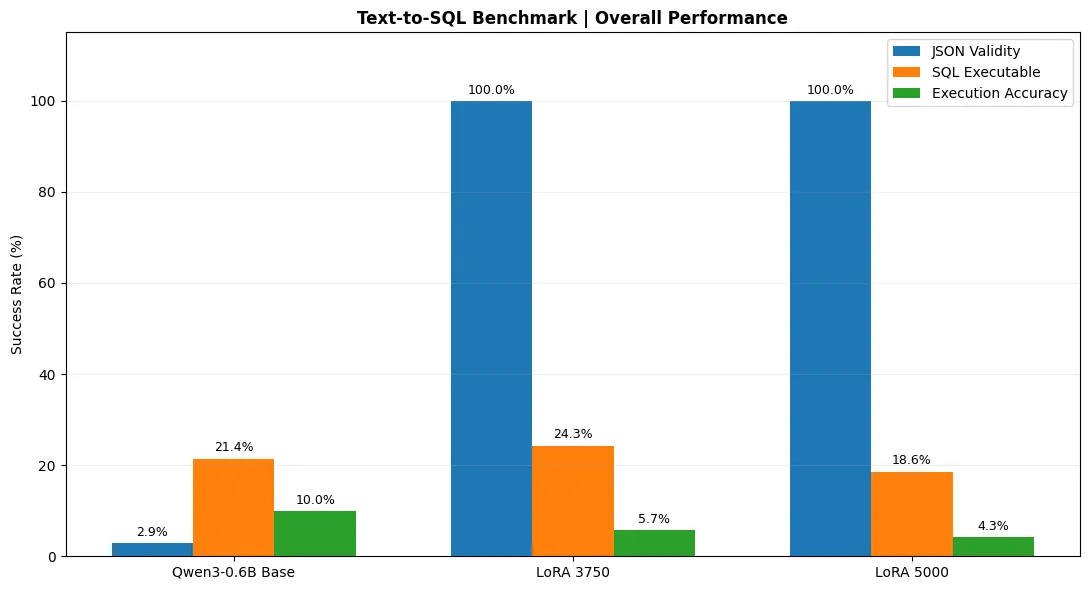
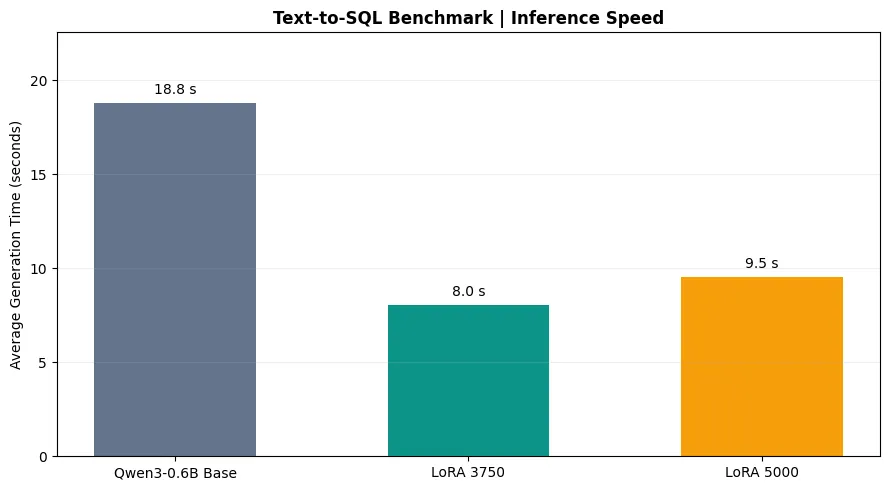
These benchmark charts provide us with a great deal of information about the models. We can see that the training was definitely not in vain; the AI generates SQL faster and has clearly learned the JSON schema. However, it is also clear that the incorrect SQL statements caused the base model to forget the SQL statements it had learned, leading it to deviate from our original objective.
What I Learned
- I understood the need to ensure the accuracy and quality of the dataset before training the model
- I understand why benchmarks are done; before running the benchmarks, I thought I had trained a model that actually worked well - at least better than the base model.
- I learned how to provide data to a chat model
Downloads
- Benchmark Notebooktext_to_sql_qwen3_0_6B_Benchmark.ipynb · 554.3 KB
- Benchmark 70 questions - ChatGPT Generatedbenchmark_70_full.json · 266.5 KB
- Checkpoint 3750 - the best modelcheckpoint-3750.zip · 55.7 MB
- Checkpoint 5000checkpoint-5000.zip · 55.7 MB
Notebook
Code and saved outputs, as recorded in the notebook.
!pip install -q unsloth trl datasets
from datasets import load_dataset

raw_datasets = load_dataset("gretelai/synthetic_text_to_sql")
raw_datasets
raw_train_dataset = raw_datasets["train"]
raw_train_dataset[0]
raw_train_dataset.features
# Veri setini rastgele karıştırıp 25.000 satıra indiriyoruz
shortened_train = raw_datasets["train"].shuffle(seed=42).select(range(25000))
shortened_test = raw_datasets["test"].shuffle(seed=42).select(range(min(2500, len(raw_datasets["test"]))))

from datasets import DatasetDict
shortened_datasets = DatasetDict({
    "train": shortened_train,
    "test": shortened_test
})

display(shortened_datasets)
from unsloth import FastLanguageModel
import torch

model, tokenizer = FastLanguageModel.from_pretrained(
    model_name="unsloth/Qwen3-0.6B",
    max_seq_length=1024,
    dtype=torch.float16,
    load_in_4bit=False,
)

model = FastLanguageModel.get_peft_model(
    model,
    r=16,
    lora_alpha=16,
    target_modules=[
        "q_proj", "k_proj", "v_proj", "o_proj",
        "gate_proj", "up_proj", "down_proj"
    ],
    lora_dropout=0,
    bias="none",
    use_gradient_checkpointing="unsloth",
)
print(type(model).__name__)
print(model.config.architectures)
inputs = tokenizer("This is the first sentence.", "This is the second one.", "This is the third bear.")
inputs
tokenizer.convert_ids_to_tokens(inputs["input_ids"])
import json

def tokenize_fn(example):
    input_text = json.dumps({
        "context": example["sql_context"],
        "prompt": example["sql_prompt"]
    }, ensure_ascii=False)

    output_text = json.dumps({
        "sql": example["sql"],
        "explanation": example["sql_explanation"]
    }, ensure_ascii=False)

    prompt_messages = [
        {"role": "user", "content": input_text}
    ]

    prompt = tokenizer.apply_chat_template(
        prompt_messages,
        tokenize=False,
        add_generation_prompt=True
    )

    # Hedef yanıtın sonunu EOS tokenıyla işaretliyoruz.
    completion = output_text + tokenizer.eos_token

    prompt_ids = tokenizer(
        prompt, add_special_tokens=False, padding=True, truncate=True
    )["input_ids"]

    completion_ids = tokenizer(
        completion, add_special_tokens=False, padding=True, truncate=True
    )["input_ids"]

    input_ids = prompt_ids + completion_ids

    labels = [-100] * len(prompt_ids) + completion_ids

    return {
        "input_ids": input_ids,
        "attention_mask": [1] * len(input_ids),
        "labels": labels
    }

def tokenize_batch(batch):
    results = {
        "input_ids": [],
        "attention_mask": [],
        "labels": []
    }

    for i in range(len(batch["sql_prompt"])):
        example = {
            "sql_context": batch["sql_context"][i],
            "sql_prompt": batch["sql_prompt"][i],
            "sql": batch["sql"][i],
            "sql_explanation": batch["sql_explanation"][i]
        }

        tokens = tokenize_fn(example)

        for key in results:
            results[key].append(tokens[key])

    return results
tokenized_datasets = shortened_train.map(tokenize_batch, batched=True)
tokenized_test_datasets = shortened_test.map(tokenize_batch, batched=True)

tokenized_datasets
tokenized_test_datasets
from transformers import DataCollatorForSeq2Seq

data_collator = DataCollatorForSeq2Seq(
    tokenizer=tokenizer,
    model=model,
    padding=True,
    label_pad_token_id=-100,
    return_tensors="pt"
)
samples = tokenized_datasets[:8]
samples = {k: v for k, v in samples.items() if k in ["input_ids", "attention_mask", "labels"]}
[len(x) for x in samples["input_ids"]]
list_samples = [
    {key: samples[key][i] for key in samples}
    for i in range(len(samples["input_ids"]))
]

batch = data_collator(list_samples)
{k: v.shape for k, v in batch.items()}
from transformers import TrainingArguments

training_args = TrainingArguments(
    output_dir="qwen3-sql-unsloth",
    per_device_train_batch_size=5,
    per_device_eval_batch_size=3,
    gradient_accumulation_steps=2,
    num_train_epochs=10,
    learning_rate=1e-4,
    fp16=True,
    bf16=False,
    optim="adamw_8bit",
    logging_steps=20,
    eval_strategy="epoch",
    save_strategy="epoch",
    save_total_limit=2,
    load_best_model_at_end=True,
    metric_for_best_model="eval_loss",
    greater_is_better=False,
    report_to="none",
)
from transformers import Trainer

trainer = Trainer(
    model,
    training_args,
    train_dataset=tokenized_datasets,
    eval_dataset=tokenized_test_datasets,
    data_collator=data_collator,
    processing_class=tokenizer,
)
import os

os.environ["PYTORCH_ALLOC_CONF"] = "expandable_segments:True"
trainer.train()